> For the complete documentation index, see [llms.txt](https://support.kea.ai/llms.txt). Markdown versions of documentation pages are available by appending `.md` to page URLs; this page is available as [Markdown](https://support.kea.ai/kea-ai-customer-faqs/how-do-i-handle-unexpected-location-closures.md).
# How do I handle unexpected location closures?
Power outage, weather closure, emergencies, or just simply want to turn the AI off for the day.
We get it - things happen and we're here to help. You have a few different options for how you want to manage your Kea Voice AI agent, should you need to adjust on the spot:
**Close the restaurant completely - no phone ordering allowed**
1. Log into your Kea portal at app.kea.ai
2. Adjust your AI Greeting inside your Location to let your callers know you are closed.
1\.
```
```
3. Select the green Orders button and then toggle ordering from ON (in green) to OFF (orange).
1. This will keep the AI Agent on and still answering questions about the menu, hours, etc - but if the customer wants to place an order, it will let them know that they cannot place a phone order at this time.
1. The caller will then have the option to have the Online Ordering link texted to them or be forwarded to the store.
1\.
```
1.
```
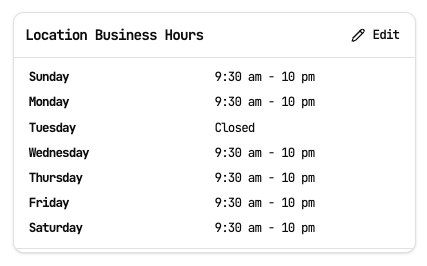
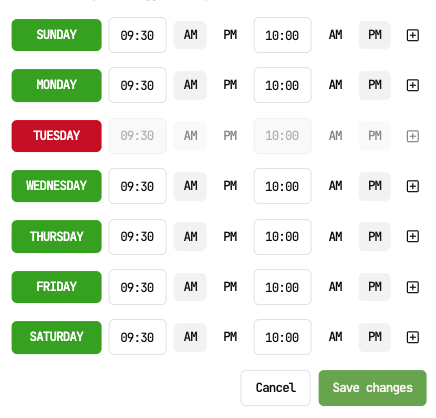
4. Adjust your Location Hours as CLOSED by hitting the day of the week (or more) that you wish to be closed for.
**Have callers be forwarded to the store immediately (bypass the AI)**
[See Call Forwarding](https://support.kea.ai/how-can-the-ai-forward-calls-to-the-store)
1. Log into your Kea portal at app.kea.ai
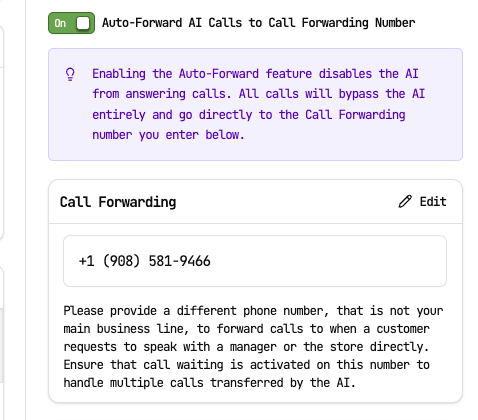
2. Ensure you have a Secondary Line in the Call Forwarding box (that is different from your main business line).
3. Toggle the Auto-Forward AI calls to ON
---
# Agent Instructions
This documentation is published with GitBook. GitBook is the documentation platform designed so that both humans and AI agents can read, navigate, and reason over technical content effectively. Learn more at gitbook.com.
## Querying This Documentation
If you need additional information that is not directly available in this page, you can query the documentation dynamically by asking a question.
Perform an HTTP GET request on the current page URL with the `ask` query parameter, and the optional `goal` query parameter:
```
GET https://support.kea.ai/kea-ai-customer-faqs/how-do-i-handle-unexpected-location-closures.md?ask=&goal=
```
`ask` is the immediate question: it should be specific, self-contained, and written in natural language.
`goal` is optional and describes the broader end goal you are ultimately trying to accomplish on behalf of the user. GitBook uses it to tailor the answer towards what is most useful for that goal.
The response will contain a direct answer to the question and relevant excerpts and sources from the documentation.
Use this mechanism when the answer is not explicitly present in the current page, you need clarification or additional context, or you want to retrieve related documentation sections.